WANT TO GROW YOUR ORGANIC SEARCH CHANNEL? SCHEDULE YOUR DEMO NOW.

Breadcrumb Rich Results

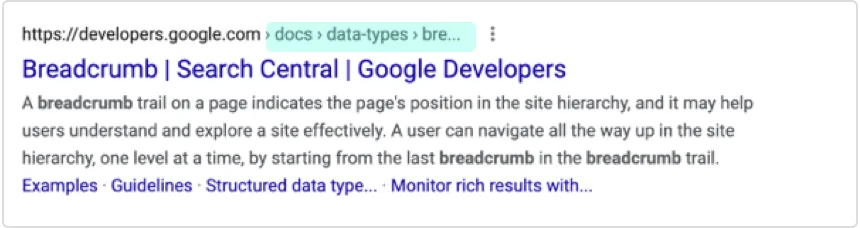
A breadcrumb trail on a page indicates the page’s position in the site hierarchy, and it may help users understand and explore a site effectively. A user can navigate all the way up in the site hierarchy, one level at a time, by starting from the last breadcrumb in the breadcrumb trail.

Breadcrumb Rich Results Example
breadcrumb.png

Huckabuy’s software looks for specific HTML code in order to mark up the information on your page so it qualifies to show breadcrumbs in search results.

What does your website need?

Most CMS platforms like WordPress or Shopify have breadcrumbs built-in and you simply need to enable them. If you have a custom-built site, here are more details on what is needed.

*For full documentation on breadcrumb structured data visit: https://developers.google.com/search/docs/data-types/breadcrumb

Frequently Asked Questions
  • A breadcrumb trail on a webpage is a navigational tool that indicates the page's position in the site hierarchy. It helps users understand and explore a site effectively by allowing them to navigate up the site hierarchy, one level at a time.

  • A user can navigate all the way up in the site hierarchy, one level at a time, by starting from the last breadcrumb in the breadcrumb trail. This allows for easy and efficient navigation through the website.

  • Huckabuy's software is used to mark up the information on your page so it qualifies to show breadcrumbs in search results. It looks for specific HTML code to do this.

  • Most CMS platforms like WordPress or Shopify have built-in breadcrumb features. Users simply need to enable them to use this navigation tool on their websites.

  • For a custom-built site to have breadcrumbs, specific details are needed. These include the URL to the webpage that represents the breadcrumb, the title of the breadcrumb displayed for the user, and the position of the breadcrumb in the breadcrumb trail.

  • The position of a breadcrumb signifies its place in the breadcrumb trail. For instance, Position 1 signifies the beginning of the trail.

  • Full documentation on breadcrumb structured data can be found at https://developers.google.com/search/docs/data-types/breadcrumb. This resource provides comprehensive information on the topic.

  • A breadcrumb trail benefits the user by providing a clear and easy way to navigate the website. It allows users to understand the site hierarchy and explore the site more effectively.

  • The breadcrumb name is the title of the breadcrumb that is displayed for the user. It helps the user understand what the breadcrumb represents in the site hierarchy.

  • For a webpage to qualify to show breadcrumbs in search results, it means that the page has been properly marked up with the necessary information. This includes specific HTML code that Huckabuy's software looks for.