Carousel Rich Results
A carousel provides multiple rich card results in a list format within the SERPs. The only object types that will produce a carousel include Article, Recipe, Course, Restaurant, and Movie. To create eligibility for a carousel all objects must be the same. Generally, carousels only appear on mobile devices and it is possible to be featured in a carousel list among other websites.
Carousel structured data markup acquires more real estate above the fold in the SERPs, creating greater visibility across many pages as you can scroll through the list, and improving CTR.
Carousel Rich Results Example:
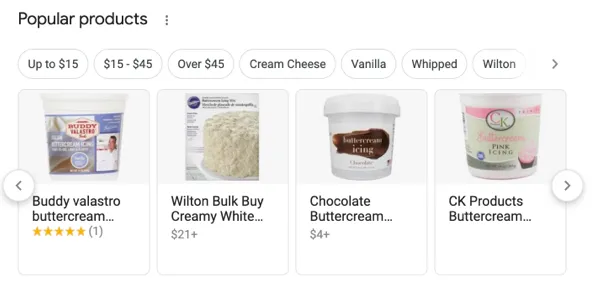
Huckabuy’s software looks for specific HTML code in order to mark up the information on your page so it qualifies to show in search results.
There are two ways to implement Carousel markup:
1. Summary page + multiple full details pages
This markup provides a description of each item in the list and the descriptions will point to the appropriate page from the list that is unique for that particular topic.
2. Single all in a one-page list
This markup provides one single page that contains all of the list information including the full text/description.
What does your webpage need?
To create a carousel you must define it as an ItemList and it must have at least two ListItems to qualify.
- If creating carousel for a summary page then the ListItem should only include the type, position, and URL properties
- If creating a single page list then apart from the requirements for carousel the structured data objects designated for the carousel must also have all of their unique required properties included.
Required Properties
- Item: Thing (only for single all in one pages)
- item.name
- item.url
- Position: Integer – this is a number format referring to what position the item will show in the carousel
- URL: URL – this is for summary pages only; this is the canonical URL for the item list page, it must be unique and live on the same domain
For full technical documentation on carousel structured data visit: https://developers.google.com/search/docs/data-types/carousel